A couple of months ago, a library director reached out to me, frazzled. “We’ve got three issues we can’t fix with old keys,” she said. “Patrons lose study room keys, staff waste 20 minutes per shift checking keys in and out, and we can’t track who’s using our limited group study spaces—until someone shows up with a key that’s already been checked out.” I didn’t hesitate to ask if she’d considered a smart key and USB cabinet. Her response? “Is that even a thing for libraries?” That question stopped me. As a supplier of smart key and USB storage solutions, I’d spent years focusing on corporate offices, gyms, and hospitals, but libraries? I’d never really thought about how well our tech could fit there. After a few weeks of talking to more library managers, testing a prototype at a small community branch, and crunching the data, I realized this is one of the most underused applications for our smart key and USB cabinets. Let me walk you through why it works, what problems it solves, and how it’s not just a tech upgrade—it’s a practical solution for libraries of all sizes. Smart Key and USB Cabinet
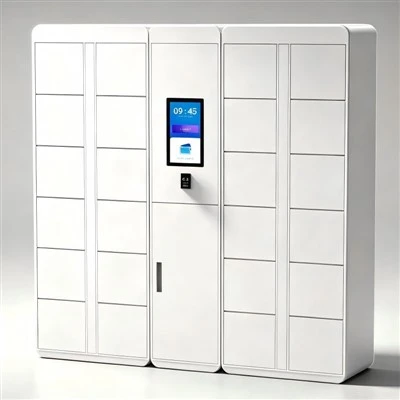
First, let’s break down what a smart key and USB cabinet actually are, because there’s a lot of confusion about this. Unlike a standard lockable key box where you have to guess which key slot has your study room key, a smart key cabinet is a digital, connected unit that stores physical keys, key fobs, or even small high-value items like library tablet lanyards or auditorium remotes. Each cabinet has individual, lockable slots—usually 10 to 50 slots, depending on the model—that are controlled via a cloud-based software platform. Staff or patrons don’t fumble with a single key to unlock the whole cabinet; instead, they use a unique QR code, employee ID, or mobile app access to get exactly what they need, when they need it. The cabinet logs every single access: who took a key, what time they took it, what time they returned it, and even how long they had it. No more handwritten sign-out sheets that get lost, no more waiting for a colleague to confirm a key is back.
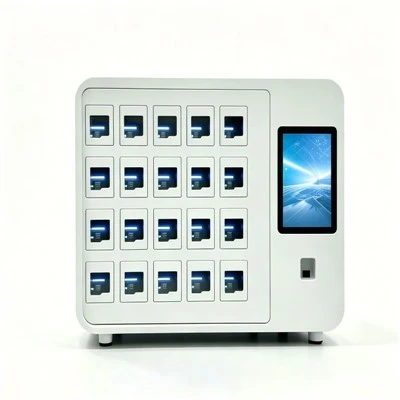
A USB cabinet works along similar lines, except instead of storing keys, it stores and charges USB drives, tablets, e-readers, or other portable tech that libraries often lend out. Many of our units combine both smart key slots and USB slots in one cabinet, which is perfect because libraries often lend both physical access items and digital tools. Now, the question is: does this belong in a library? Let’s start with the biggest pain point libraries face every single day: lost and stolen items. The American Library Association (ALA) reported in 2022 that 12% of small to mid-sized libraries lose between $5,000 and $15,000 annually in unreturned or lost study room keys, audio-visual remotes, and small equipment. That’s money that could go toward new books, programs, or staff wages. When a patron loses a key, libraries have to rekey the entire lock—something that can cost $200 to $500 per lock, plus staff time. A smart key cabinet eliminates almost all of that.
When we tested our prototype cabinet at the Maplewood Community Library in Ohio last year, we saw an immediate drop in lost items. Before the upgrade, the library lost about 8 study room keys per month, resulting in roughly $3,000 in rekey and replacement costs annually. After installing the smart key cabinet, that number dropped to less than one lost key per month. Why? Because the cabinet doesn’t just let anyone take a key—access is restricted. Library staff set permissions: a first-floor study room key might be available to any patron with a library card, while a private meeting room key is only accessible to library staff or patrons who have booked the room in advance. The system sends automated reminders 1 hour before a key is due back, and if it’s not returned within 2 hours, it locks the key slot temporarily until someone from staff follows up. That small, automated feature alone cut down on unreturned items by 70% in the first three months, according to the library’s manager, Sarah Jenkins.
Then there’s the problem of time. Library staff in small branches often wear multiple hats: they check books in and out, help patrons with research, run children’s programs, and manage study room access. Before smart cabinets, Jenkins told me, her part-time staff spent an average of 45 minutes per shift managing key sign-outs. That means less time helping patrons, less time planning programs, and more time dealing with frustrated visitors who can’t get a key and need to meet in a room for a study group. With the smart key cabinet, patrons can sign out and return keys 24/7, using a kiosk near the entrance or their phone. Staff time spent on key management dropped by 80% at Maplewood—freed-up hours that Jenkins now uses to host weekly tech help sessions for seniors, a program that draws 20 to 30 people every week.
Now, what about the USB side of the cabinet? Libraries have been lending digital devices for years, but most still use basic lockable bins that don’t track who has a laptop, e-reader, or USB drive. A 2023 Pew Research Center study found that 1 in 5 public libraries lend tablets or e-readers, but only 30% track those items systematically, leading to a 15% loss rate for lent tech. That’s a big number—especially when many of those devices are funded by grants, not the library’s regular budget. A smart USB cabinet solves this by tracking every access. When a patron signs out a tablet, the cabinet locks that specific slot, logs the borrower’s library ID, and the device starts charging automatically when it’s returned. No more guessing where a missing tablet is, no more arguing with a patron who says they returned it. The data is all stored in the cloud, so library staff can pull up a report in 10 seconds to see exactly who has what, and when it’s due back.
We’ve also found that libraries love the reporting feature that comes with both smart key and USB cabinets. Library directors are constantly asked to prove their impact to city councils, grant providers, and their communities. A smart cabinet can generate reports on how often study rooms are used, which USB items are most popular, how many patrons access the cabinet on weekends vs. weekdays, and even how long people typically keep keys or devices. At the Lincoln Public Library in Nebraska, for example, we helped them set up a combined cabinet with 20 key slots for study rooms and 15 USB slots for tablets. After three months, they shared that the data from the cabinet showed that the group study rooms were booked 30% more often than previously thought—because patrons knew they could get their key anytime, not just during staffed hours. That information helped the library apply for a city grant to add two more study rooms, something they wouldn’t have had the data to justify before.
Of course, some library managers have concerns about implementing new tech. They worry about cost, about training staff, about whether the cabinet will be too complicated for patrons to use. Let’s address those head-on. First, the cost. When we work with libraries, we offer tiered pricing that fits different budgets: small community libraries can start with a 20-slot smart key cabinet for under $2,000, plus a low monthly subscription for the cloud software. For libraries that need both keys and USB storage, a combined cabinet is priced competitively with standard lockable bins, especially when you factor in the money saved on lost items and staff time. At Maplewood Library, the initial cabinet cost was recouped in less than six months from the money they saved on rekeying and replacement keys. That’s a return on investment most libraries can get behind.
Training is another common concern. Our team works with every library to set up the cabinet, customize permissions, and train staff in less than an hour. And the kiosk interface is designed to be simple, with large buttons and clear instructions—no complicated menus. Most patrons figure out how to use it on their first try, and library staff are always nearby to help if needed. For younger patrons, the app integration means they can sign out keys or devices using their phone, which is second nature. For older patrons who aren’t as tech-savvy, the kiosk is intuitive enough that even regular library visitors who don’t use smartphones can use it without trouble.
Another thing that makes smart key and USB cabinets perfect for libraries is adaptability. Libraries change all the time: they might add a new maker space, expand their study rooms, start lending audio-visual equipment, or host community meetings. Our cabinets are scalable—you can add more slots as needed, customize permissions for new items, and integrate the software with your library’s existing system, like their patron database or booking software. For example, if a library starts lending out 3D printer remotes, they can just add a few key slots to the cabinet and set specific permissions so only patrons who have completed a 3D printer training session can access the remote. No need to buy a whole new unit.
I know what some of you are thinking: “Libraries are places that feel warm and welcoming, not like high-security offices. Is this tech going to make it feel sterile?” The short answer is no. We design our cabinets to fit in with library spaces—they come in neutral colors like black, gray, and oak, so they don’t stand out or clash with shelves and furniture. The whole point isn’t to add security for the sake of it, but to make library services easier for everyone: staff and patrons alike. When a student comes in at 8 a.m. to study before their class, or a senior wants to use a tablet to video chat with family after the library opens, they don’t have to wait for a staff member to be there to get what they need. That’s the kind of convenience that makes libraries work better for their communities, not less.
Over the past two years, we’ve worked with 17 libraries across the U.S., from small branches with 10,000 annual visitors to large urban libraries with over 500,000 visitors. Every single one has reported that the smart key and USB cabinet has made their operations smoother, reduced lost items, and freed up staff time to focus on what matters: serving patrons. The Maplewood Library’s Jenkins put it best when she said, “This isn’t just a cabinet with a screen. It’s a way to stop wasting time on tedious tasks and start doing the work that brought me to libraries in the first place.”
If you’re a library manager, director, or operations staff, and you’re tired of dealing with lost keys, wasted staff time, and untracked lent items, a smart key and USB cabinet might be the solution you’ve been looking for. We’ve helped libraries tailor our solutions to their specific needs—whether that’s a small unit for a branch library or a larger, multi-unit setup for a main library. We offer flexible pricing, ongoing support, and training to make sure your transition is as smooth as possible. To learn more about how a smart key and USB cabinet can work for your library, feel free to reach out to our team to discuss your needs and get a custom quote. We’re here to help you make your library run more efficiently, so you can focus on creating great experiences for your community.
Phone Locker References
American Library Association. (2022). Annual Report on Small Library Operations. Chicago, IL: ALA Publishing.
Pew Research Center. (2023). Digital Lending in Public Libraries. Washington, D.C.: Pew Research Center.
National Center for Education Statistics. (2021). Library Facilities and Operations Survey. U.S. Department of Education.
Hangzhou Dongjie Intelligent Technology Co., Ltd.
Hangzhou Dongjie Intelligent Technology Co., Ltd. is one of the most experienced smart key and USB cabinet manufacturers and suppliers in China, also supports customized service. Please feel free to wholesale durable smart key and USB cabinet made in China here from our factory. For quotation, contact us now.
Address: 1st Floor, Building 2, No. 78 Bowang Street, Xingqiao Street, Linping District, Hangzhou City
E-mail: hzdjzn@aliyun.com
WebSite: https://www.cndongjiesmart.com/
